Verify and publish an app
Rollout status
This verification flow is implemented and tested in the candidate release. Its database migration and enforcement are not enabled in production yet. Existing applications must complete verification before the cutover. See release status.
App registration starts in testing. The owner can use a loopback callback such as http://localhost:5173/auth/callback, or a native callback with PKCE. Other users and public web callbacks require production readiness.
Complete the checklist
- Sign in to Developer Apps using your own YeboID account. Open Verify and publish app.
- Complete identity verification from your profile. A current
VERIFIEDKYC state and an active owner account are required. Your agent can prepare the integration; you complete identity verification yourself. - In Edit, add the app's HTTPS website, HTTPS privacy-policy URL and exact production callbacks. Register the permissions your SDK will request.
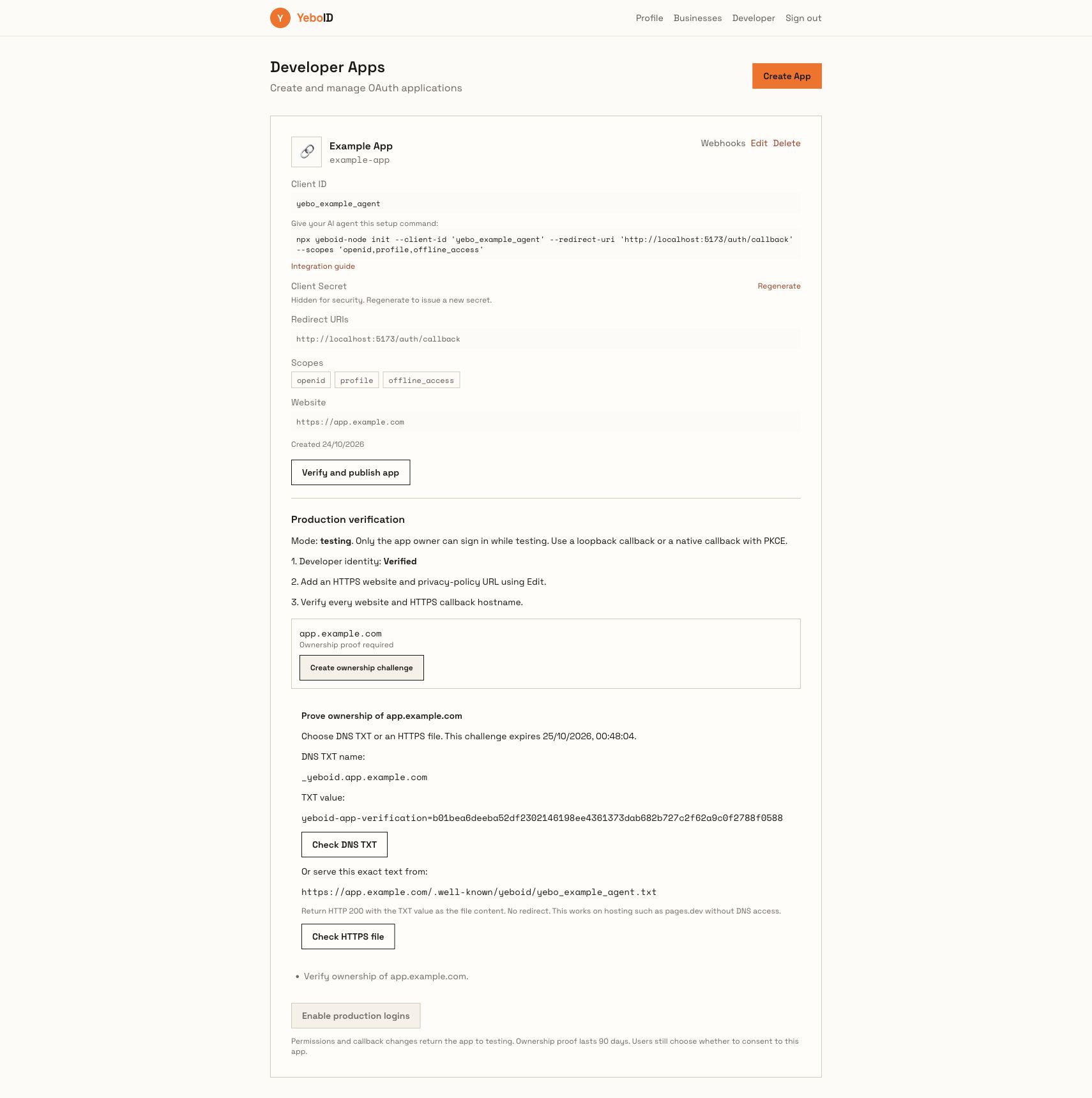
- Create an ownership challenge for every website and HTTPS callback hostname. Each hostname is exact:
example.com,www.example.comandapp.example.comare separate proofs. - Use one of the methods below, run the matching check, and then click Enable production logins when the server reports the checklist is complete.
DNS TXT proof
Create the record shown in the portal:
Type:  TXT
Name:  _yeboid.app.example.com
Value: yeboid-app-verification=APP_BOUND_RANDOM_CHALLENGE
DNS providers sometimes expect only the relative name. For a zone example.com, the relative name is _yeboid.app. The resolved record must match the exact challenge. Wait for propagation and click Check DNS TXT.
HTTPS file proof
When you control the deployed app but cannot edit its DNS, serve the challenge text at:
https://app.example.com/.well-known/yeboid/YOUR_CLIENT_ID.txtReturn HTTP 200 with the exact challenge as the file body. Do not redirect to another host, a login page or the application shell. This is suitable for hosting such as pages.dev. Click Check HTTPS file.
The API refuses private/internal network destinations, DNS rebinding, redirects, failed TLS, incorrect bodies, responses over 8 KiB and expired challenges. A failed check remains visible; it does not manufacture successful ownership.
Proof lifetime and changes
Challenges last 24 hours. Verified ownership lasts 90 days. Creating a new challenge invalidates the previous proof and returns the app to testing. Callback, permission, website or privacy-policy changes also return the app to testing and revoke its refresh tokens. Review the checklist and publish again.
Publishing uses a configuration version check so a simultaneous app edit cannot publish stale settings. Owner KYC, account status and domain-proof expiry are checked again when issuing credentials. First-party Omevision apps follow the same policy.
Changing the app to testing revokes its refresh tokens. Existing local JWT consumers may accept an already-issued token until expiry; introspection provides current authorization state.
API for developer tools
These endpoints require a direct signed-in owner token. An app's delegated OAuth token cannot manage developer verification, even if its human subject owns that app.
| Endpoint | Body / result |
|---|---|
GET /apps/:id/onboarding | Mode, readiness, missing requirements, exact domains and expiry |
POST /apps/:id/domains/challenge | { "hostname": "app.example.com" } → DNS and HTTPS instructions |
POST /apps/:id/domains/verify | { "hostname": "app.example.com", "method": "dns" } or "https" |
POST /apps/:id/publish | Enable production only when all requirements pass |
POST /apps/:id/unpublish | Return to testing and revoke refresh tokens |
app_not_verified, app_in_testing, challenge_expired, challenge_changed, ownership_check_failed and app_changed include actionable descriptions. Requests from another owner receive 404. Repeated ownership checks are rate limited.
Screenshot walkthrough
The screenshot below uses a synthetic account and simulated DNS in an isolated local fixture. It illustrates the candidate screen; it is not proof of a real person's KYC, a real DNS record or production enforcement.